 Deutsch
 Русский

Components
The building blocks of this template, each with the markup to copy. Styles are in css/style.css (and css/pages.css for the newer pieces); behavior is in js/script.js.
Colors
The whole template uses one small palette. There are no CSS variables in v1: to change a color, replace its value everywhere in css/style.css.
- Teal
#1cbbb4 - Teal dark
#00a99d - Teal deep
#00857c - Mint
#e3f6f5 - Mint light
#e8f8f7 - Red
#e8202a - Yellow
#f7c016 - Light yellow
#fff799 - Grey 1
#464646 - Grey 2
#636363 - Grey 3
#959595 - Grey 4
#ebebeb - Grey 5
#fafafa
/* css/style.css */
a{color: #1cbbb4;}
a:hover{color: #1cbbb4; text-decoration: none;}
.btn-default.btn4{background: #00a99d;}
.btn-default.btn4:hover{background: #e8202a;}
Typography
Raleway throughout. The page title (h1) has a grey rule with a short teal bar; the big centered h2 is the section title used on the home page.
Page title (h1)
Section title
Small teal heading (h4)
Body text is 14px Raleway. Links are teal and lose their underline on hover.
The best trip is the one that still feels easy on the last day.
<h1>Page title (h1)</h1>
<h2>Section title</h2>
<div class="title1">A centered intro line under a section title.</div>
<h4>Small teal heading (h4)</h4>
<blockquote class="blockquote1">Quote text
  <div class="author">Name <span>Role</span></div>
</blockquote>
Buttons
Add a second class to btn-default. Teal buttons turn red on hover; the red button is for the main action on a page.
<div class="cmp-row">
  <a href="#buttons" class="btn-default btn4">Teal button</a>
  <a href="#buttons" class="btn-default btn3">Red button</a>
  <a href="#buttons" class="btn-default btn2">Read More</a>
  <a href="#buttons" class="btn-default btn-line">Outline button</a>
</div>
<div class="cmp-row">
  <a href="#buttons" class="btn-default btn4 btn-lg1">Large teal</a>
  <a href="#buttons" class="btn-default btn3 btn-lg1">Large red<i class="fa-solid fa-arrow-right" aria-hidden="true"></i></a>
</div>
<div class="cmp-row">
  <button type="button" class="btn-default btn-form1-submit">Search (form button)</button>
</div>
btn-lg1 and btn-line live in css/pages.css; the others are in css/style.css.
Form fields
Put a native <select> in .select1_inner and a date input in .input1_inner. js/script.js turns them into the template’s dropdown and date range picker automatically; the form still submits the native values. Two date fields in one form pick a range.
<form action="components.html" class="cmp-fields">
  <div class="select1_wrapper">
    <label for="c-cabin">Cabin class:</label>
    <div class="select1_inner">
      <select id="c-cabin" name="cabin" class="select">
        <option value="economy">Economy</option>
        <option value="premium">Premium economy</option>
        <option value="business">Business</option>
        <option value="first">First</option>
      </select>
    </div>
  </div>
  <div class="input1_wrapper">
    <label for="c-in">Check-in:</label>
    <div class="input1_inner">
      <input type="date" id="c-in" name="checkin">
    </div>
  </div>
  <div class="input1_wrapper">
    <label for="c-out">Check-out:</label>
    <div class="input1_inner">
      <input type="date" id="c-out" name="checkout">
    </div>
  </div>
  <div>
    <label for="c-name">Full name:</label>
    <input type="text" id="c-name" name="name" class="form-control" placeholder="As on your passport" autocomplete="name">
  </div>
  <div>
    <label for="c-mail">Email:</label>
    <input type="email" id="c-mail" name="email" class="form-control" placeholder="you@example.com" autocomplete="email">
  </div>
</form>
Checkboxes and radios
A hidden input with class checkbox1-custom, followed by its label. Radios use the same classes and show a round mark.
<div class="cmp-choices">
  <fieldset>
    <legend>Amenities</legend>
    <input id="c-wifi" class="checkbox1-custom" name="amenity" value="wifi" type="checkbox" checked>
    <label for="c-wifi" class="checkbox1-custom-label">Free Wi-Fi</label><br>
    <input id="c-pool" class="checkbox1-custom" name="amenity" value="pool" type="checkbox">
    <label for="c-pool" class="checkbox1-custom-label">Swimming pool</label><br>
    <input id="c-bfast" class="checkbox1-custom" name="amenity" value="breakfast" type="checkbox" checked>
    <label for="c-bfast" class="checkbox1-custom-label">Breakfast included</label>
  </fieldset>
  <fieldset>
    <legend>Trip type</legend>
    <input id="c-rt" class="checkbox1-custom" name="trip" value="round" type="radio" checked>
    <label for="c-rt" class="checkbox1-custom-label">Round trip</label><br>
    <input id="c-ow" class="checkbox1-custom" name="trip" value="oneway" type="radio">
    <label for="c-ow" class="checkbox1-custom-label">One way</label><br>
    <input id="c-mc" class="checkbox1-custom" name="trip" value="multi" type="radio">
    <label for="c-mc" class="checkbox1-custom-label">Multi-city</label>
  </fieldset>
</div>
Tabs
A list of links to panel ids, then the panels. The item with class active opens first. js/script.js adds the ARIA roles and arrow-key support.
<div class="tabs3">
  <div class="tabs3_tabs">
    <ul>
      <li class="active"><a href="#tabs3-a">Popular</a></li>
      <li><a href="#tabs3-b">Recent</a></li>
    </ul>
  </div>
  <div class="tabs3_content">
    <div id="tabs3-a">
      <div class="news1"><a href="post.html"><div class="txt1">Your first trip to Georgia: Tbilisi to Kazbegi</div><div class="txt2">Date: <span>05 November, 2026</span></div></a></div>
      <div class="news1"><a href="post.html"><div class="txt1">How to pack for a two-week cruise</div><div class="txt2">Date: <span>12 November, 2026</span></div></a></div>
    </div>
    <div id="tabs3-b">
      <div class="news1"><a href="post.html"><div class="txt1">Five quiet beaches on the Algarve</div><div class="txt2">Date: <span>20 November, 2026</span></div></a></div>
    </div>
  </div>
</div>
Chips and badges
Chips are toggle buttons for filters (set aria-pressed); badges are small labels.
<div class="cmp-row chips" role="group" aria-label="Continent (example)">
  <button type="button" class="chip" aria-pressed="true">All</button>
  <button type="button" class="chip" aria-pressed="false">Europe</button>
  <button type="button" class="chip" aria-pressed="false">Asia</button>
  <button type="button" class="chip" aria-pressed="false">Americas</button>
</div>
<div class="cmp-row">
  <span class="badge1">3 nights</span>
  <span class="badge1 badge1--solid">Free cancellation</span>
  <span class="badge1 badge1--red">-30%</span>
  <span class="badge1 badge1--yellow">Great in October</span>
  <span class="badge1 badge1--grey">Sold out</span>
</div>
The demo chips here are static; see js/pages.js for the filter on destinations.html.
Rating stars
Stars are Font Awesome icons in yellow. Give the group role="img" and an aria-label so screen readers hear the score.
<div class="cmp-stars">
  <div class="stars1" role="img" aria-label="4 out of 5 stars"><i class="fa-solid fa-star" aria-hidden="true"></i><i class="fa-solid fa-star" aria-hidden="true"></i><i class="fa-solid fa-star" aria-hidden="true"></i><i class="fa-solid fa-star" aria-hidden="true"></i><i class="fa-regular fa-star" aria-hidden="true"></i></div>
  <div class="stars1" role="img" aria-label="4.5 out of 5 stars"><i class="fa-solid fa-star" aria-hidden="true"></i><i class="fa-solid fa-star" aria-hidden="true"></i><i class="fa-solid fa-star" aria-hidden="true"></i><i class="fa-solid fa-star" aria-hidden="true"></i><i class="fa-solid fa-star-half-stroke" aria-hidden="true"></i></div>
  <span class="cmp-score"><b>8.9</b>Excellent · 412 reviews</span>
</div>
Pagination
Previous and Next sit at the ends; the current page has class active.
<div class="pager_wrapper">
  <ul class="pager clearfix">
    <li class="prev"><a href="#pagination">Previous</a></li>
    <li class="li"><a href="#pagination">1</a></li>
    <li class="active"><a href="#pagination" aria-current="page">2</a></li>
    <li class="li"><a href="#pagination">3</a></li>
    <li class="li"><a href="#pagination">4</a></li>
    <li class="next"><a href="#pagination">Next</a></li>
  </ul>
</div>
Alerts
Messages for forms and booking steps. Use role="alert" only for errors that appear after an action.
<div class="alert1"><i class="fa-solid fa-circle-info" aria-hidden="true"></i><div><b>Free cancellation until Nov 28, 2026</b>You can change or cancel online at any time before then.</div></div>
<div class="alert1 alert1--warn"><i class="fa-solid fa-triangle-exclamation" aria-hidden="true"></i><div><b>Only 2 rooms left at this price</b>Prices may go up after this booking.</div></div>
<div class="alert1 alert1--error"><i class="fa-solid fa-circle-xmark" aria-hidden="true"></i><div><b>We could not take the payment</b>Check the card number and try again, or use another card.</div></div>
<div class="alert1 alert1--plain"><i class="fa-regular fa-clock" aria-hidden="true"></i><div>Prices last checked 5 minutes ago.</div></div>
Cards
The popular cruise card from the home page and the hotel result card from the results pages. Both show a teal photo caption and a teal bottom rule on hover (shown open here).
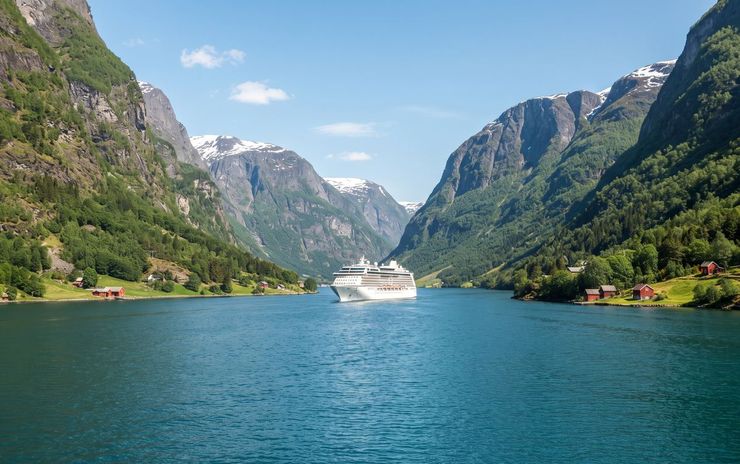
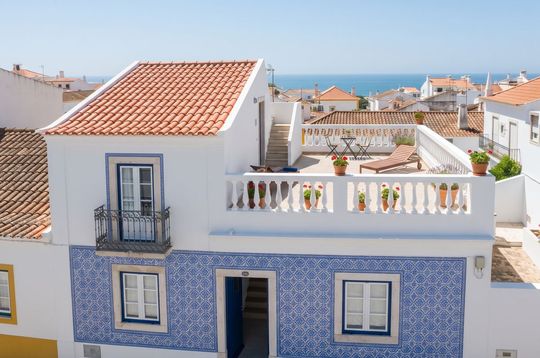
<div class="popular">
  <div class="popular_inner">
    <figure>
      <img src="images/popular03.jpg" width="370" height="232" alt="" class="img-fluid">
      <div class="over">
        <div class="v1">Norway <span>12 Deal Offers</span></div>
        <div class="v2">Fjords, waterfalls and long summer light.</div>
      </div>
    </figure>
    <div class="caption">
      <div class="txt1"><a class="card-link" href="booking-cruise.html"><span>Norway</span> 7 Night Tour</a></div>
      <div class="txt2">Seven nights from Bergen through the fjords, with a day in Geiranger.</div>
      <div class="txt3 clearfix">
        <div class="left_side">
          <div class="stars1" role="img" aria-label="5 out of 5 stars"><i class="fa-solid fa-star" aria-hidden="true"></i><i class="fa-solid fa-star" aria-hidden="true"></i><i class="fa-solid fa-star" aria-hidden="true"></i><i class="fa-solid fa-star" aria-hidden="true"></i><i class="fa-solid fa-star" aria-hidden="true"></i></div>
          <div class="nums">- 96 Reviews</div>
        </div>
        <div class="right_side"><a href="booking-cruise.html" class="btn-default btn1">See All</a></div>
      </div>
    </div>
  </div>
</div>

<div class="thumb5">
  <div class="thumbnail clearfix">
    <figure>
      <img src="images/hotels08.jpg" width="540" height="358" alt="" class="img-fluid">
      <div class="over">
        <div class="v1">Casa Azul <span>8.7 Review score</span></div>
        <div class="v2">Twin / Double Room</div>
      </div>
    </figure>
    <div class="caption">
      <div class="txt1">Casa Azul</div>
      <div class="txt2">Twin / Double Room</div>
      <div class="txt3 clearfix">
        <div class="left_side">
          <div class="price">$148.00</div>
          <div class="stars2" role="img" aria-label="4 out of 5 stars"><i class="fa-solid fa-star" aria-hidden="true"></i><i class="fa-solid fa-star" aria-hidden="true"></i><i class="fa-solid fa-star" aria-hidden="true"></i><i class="fa-solid fa-star" aria-hidden="true"></i><i class="fa-regular fa-star" aria-hidden="true"></i></div>
        </div>
        <div class="right_side"><a href="booking-hotel.html" class="btn-default btn1">Details</a></div>
      </div>
    </div>
  </div>
</div>
Accordion
Native <details> elements, so it works without JavaScript. Add data-accordion to the wrapper to keep one answer open at a time (js/pages.js).
Do I need a visa?
Citizens of the US, the UK, Canada and the EU can stay up to one year without a visa.
How many days do I need?
Five days covers the capital and the mountains. Ten nights adds wine country and the coast.
Can I pay in euros?
Yes, by card in US dollars, euros or pounds.
<div data-accordion>
  <details class="acc" open>
    <summary>Do I need a visa?</summary>
    <div class="acc__body"><p>Citizens of the US, the UK, Canada and the EU can stay up to one year without a visa.</p></div>
  </details>
  <details class="acc">
    <summary>How many days do I need?</summary>
    <div class="acc__body"><p>Five days covers the capital and the mountains. Ten nights adds wine country and the coast.</p></div>
  </details>
  <details class="acc">
    <summary>Can I pay in euros?</summary>
    <div class="acc__body"><p>Yes, by card in US dollars, euros or pounds.</p></div>
  </details>
</div>
Breadcrumbs
Under the page banner on inner pages.
<div class="breadcrumbs1"><a href="index.html">Home</a><span>/</span><a href="destinations.html">Destinations</a><span>/</span><span>Georgia</span></div>Icon tiles
Font Awesome 7 icons in a mint tile, in three sizes. Hide the icon from screen readers and say the meaning in text next to it.
<div class="cmp-row">
  <span class="ico-tile ico-tile--sm" aria-hidden="true"><i class="fa-solid fa-plane"></i></span>
  <span class="ico-tile" aria-hidden="true"><i class="fa-solid fa-bed"></i></span>
  <span class="ico-tile ico-tile--lg" aria-hidden="true"><i class="fa-solid fa-ship"></i></span>
</div>